

We may earn a commission for purchases using our links. Learn more.
The spectrum of features available in smart glasses in 2025 varies greatly from one brand and model to the next. The starting point is generally sunglasses with tinny speakers and maybe a front-facing camera. And the ceiling is, well…I think I found it with the VITURE Luma Ultra smartglasses.
I was quite enamored with the VITURE Luma Pro smartglasses after reviewing them a few months back. At the time I thought "Wow, this is as good as it gets with smartglasses, and it's super awesome!"
After trying the VITURE Luma Ultra, I have a new standard for what I expect from smartglasses.
They're not perfect. But they're so darn close, and I can see their full potential is within grasp, these are now the defacto recommendation I would make for anyone shopping for a premium set of smartglasses at a fair price for the value they bring to the table.
VITURE Luma ULTRA: One Paragraph Review

The VITURE Luma Ultra smart glasses unlock a new layer of immersion and technological magic by adding gesture support. The latest glasses allow you to move and manipulate digital objects and experiences in your real-world space, while maintaining all the core features that have made their previous glasses great for gaming, entertainment, and (in my opinion) productivity. To tap into their full potential, you'll want to pick up the optional smart neckband (which means you'll be buying yet another gaming accessory). Overall, the VITURE Luma Ultra delivers a smart experience that punches far above its price point.
Pros
- Amazing visuals
- SO compact to take everywhere
- Excellent device compatibility/versatility
Cons
- Best experience requires neckband accessory
- 6DoF optimization still evolving
- Another new model (Beast) coming soon
Smart Glasses
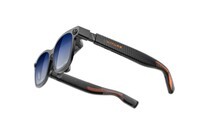
VITURE Luma Ultra Smart Glasses
Geeking Out Shop
For those looking for the best gaming experience with smart glasses, the VITURE Luma Ultra should be at the top of your list. On their own, they're phenomenal for gaming, watching movies, and even plugging into a laptop for productivity and privacy on the go. But, when paired with the Smart Neckband, an even more futuristic experience is unlocked. For a VITURE discount code use DrewKozub at checkout to save 10 percent on your order.
What Are the VITURE Luma Ultra Smart Glasses?
Let's get the basics out of the way. The VITURE Luma Ultra glasses look like a pair of stylish, slightly chunky sunglasses. You put them on, and, suddenly, you have a massive 152-inch virtual display that seems to float about 10 feet in front of you.

This is the "Ultra" model in VITURE's new line-up, and it's the one aimed at power users, and it launched in late fall of 2025. VITURE already has the "Pro" model, so what makes it "Ultra"? In a word: cameras. Its three-camera system (one RGB, two depth sensors) unlocks its most powerful features that differentiate it from the already-released VITURE Luma Pro model and the Beast model, which is coming soon.

The Ultimate Display For Gaming On-The-Go
VITURE uses the term "4K-like" a lot to describe the visual experience. To me, this was a red flag…as it seemed like they were trying to cover something up.

After digging into it, I found out the panel is 1200p , but as any display geek will tell you (if you care to give them the time to rant), just going by resolution doesn't quite tell the whole visual story.
And in the case of the VITURE Luma Ultra, those display nerds are right.
This is, without a doubt, one of the sharpest wearable displays I've ever used. It's even sharper than the VITURE Pro (which I thought looked fantastic) and most noticeable when you're reading tiny text like captions and sub-menus in video games.

This is achieved using Sony's latest micro-OLED panel combined with a bunch of optical optimizations. What this means for you:
- Text is Crisp: You can actually read email or browse the web without squinting to see tiny type.
- Movies are vivid: The brightness is a blazing 1250 nits. Combined with the built-in electrochromic film (which tints the lenses dark at the press of a button ), you get an incredible, high-contrast movie-watching experience (plus "Immersive 3D" intelligently turns any movies or shows into 3D, which is visually spectacular).
- No Haze: The lenses are clear and don't suffer from the distortion or glare I've seen on other VR headsets and smartglasses.
VITURE Luma Ultra The Ultimate Gaming Peripheral?
Right around the same time that I started testing the VITURE Luma Ultra glasses, I was also testing the ROG Xbox Ally X - what a match made in gaming heaven!

The VITURE Luma Ultra smartglasses are a darn-near essential gaming accessory for anyone on a handheld console.
The killer feature is its simple, plug-and-play compatibility. I connected it to the new ROG Xbox Ally X, and was jumping into Indiana Jones and The Great Circle on what felt like an IMAX screen.

VITURE Luma Ultra with Nintendo Switch 2
For playing on Switch 2, you'll need to pair connect to that console through the optional Pro dock accessory (this is because of how Nintendo's USB C port transfers video data). The bonus is the dock can be used as a battery pack to add juice to your console. And you can use the dock with two pairs of glasses for co-op gaming or even watching a movie with a friend all on a 152-inch private screen.

Additionally, there's an accessory that allows you to connect the dock to your console for even easier play - but it's been super popular and is hard to find in stock. So, if you spot one, get it ASAP! That's my only regret right now with my current set-up.

VITURE Luma Ultra Audio Quality
After testing a few different pairs of smartglasses over the years, I've found many compnaies will (rightfully) put all their efforts into making a great display. But audio is secondary. This isn't a huge barrier, particularly if you're using earbuds with your smartglasses, but when the audio is on par with the video, it's a stand-out feature.

This is the case with the Luma Ultra glasses. The speakers are so thin, but powered by HARMAN, and they are shockingly good. The sound is spatial and rich, but it's also directional, so people around you can't easily snoop on what you're listening to. When I wore them on a plane with my friend seated next to me, he did not realize I was watching a movie and using the built-in speakers.
The "Ultra" Part: What is 6DoF and Why Should You Care?
Okay, this is the part that separates the Luma Ultra from a simple "wearable monitor." We need to get slightly technical, but I'll make it quick.

- 3DoF (Three Degrees of Freedom): This is what most XR glasses have. It tracks your head's rotation (pitch, yaw, roll). When you turn your head, the screen follows your face. It's like having a TV stuck to your nose.
- 6DoF (Six Degrees of Freedom): This is the magic of the Luma Ultra. Thanks to its three-camera system, it also tracks your head's position in space (moving up/down, left/right, forward/back).
Why does this matter? It means you can use VITURE's SpaceWalker software to pin virtual screens in the air. You can have your Mac or Windows desktop floating in front of you as a giant multi-monitor set-up, and you can literally turn your head away from it to look at something else.
To fully take advantage of this, you'll need to get the Pro Neckband, which unlocks such a huge new world of possibilities.

I think this accessory requires its own review. But for now a few quick notes about the Neckband: * The neckband is what supports Apple Vision Pro-like gestures * Allows you to see an outline of your hands in your virtual space to navigate menus, interact with games, and more * Powers a unique OS experience that makes smart glasses feel incredibly intuitive and easy to use * Multi-screen layout for ultimate productivity * Glasses and neckband work together as a "complete" spatial computing experience - no need to tether to a PC or phone * Having just said that ,it IS super convenient to connect your phone via Bluetooth to the neckband to use as a trackpad or keyboard for typing

When pairing the VITURE Luma Ultra glasses with the Pro Neckband, this is true spatial computing. This combination is being positioned by VITURE for prosumers and enterprise work right now (think virtual walkthroughs or AI training ), the potential for future gaming and entertainment is massive and is what got me absolutely the most excited about these glasses over the Luma Pros I had previously tried.
Are Smart Glasses Practical for Everyday Wear?
If you're going to wear a screen, it better be comfortable. VITURE nailed this. While no one is quite going to mistake them for regular sunglasses, they do maintain a familiar look, while hiding some futuristic tech.

- No Glasses Needed: The Luma Ultra has built-in myopia adjustments up to -4.0D. You just turn the dials on top until the image is sharp.
- Good Fit: It comes with new magnetic nose pads that are easy to swap out to find your perfect fit.
- Lightweight: The frame is a premium translucent matte (it looks very cool), and it's light enough for extended sessions.
My big tip here is that you should take the time to try out ALL pairs of the magnetic nose pads and ALL positions for the glasses armbands (they adjust between three different positions). Because all positions and nosepads feel comfortable, but the big difference comes down to improved viewing angles, and you may not even realize something is "off" until you've Goldilocksed your way through all the possibilities.

The Bottom Line: Are the VITURE Luma Ultra Smart Glasses Worth It?
The VITURE Luma Ultra is an incredible piece of tech, but it's not for everyone.
If you just want a simple, portable screen for watching movies or casual gaming, the lower cost Luma Pro ($499) are fantastic (and more affordable) options.
Smart Glasses
VITURE Luma Ultra Smart Glasses
Geeking Out Shop
For those looking for the best gaming experience with smart glasses, the VITURE Luma Ultra should be at the top of your list. On their own, they're phenomenal for gaming, watching movies, and even plugging into a laptop for productivity and privacy on-the-go. But when paired with the Smart Neckband, an even more futuristic experience is unlocked. For a VITURE discount code use DrewKozub at checkout to save 10 percent on your order.
But the Luma Ultra is for people who want to live on the cutting edge. It's for the gamer who demands the best portable experience for their Switch 2. It's for the professional who actually wants to work with virtual monitors. And it's for the AR enthusiast who wants to see what's next right now.

I'm in Canada, and these glasses work out to about $850, whereas the VITURE Luma Pro glasses are about $700. Either way, it's a serious investment. But having been really immesed in both pairs of glasses now for a very long time and using them for gaming, watching movies and shows (often while travelling), and productivity (working on your laptop on a plane with these is a COMPLETE game-changer), here's what I'd say.
If you JUST plan buy the smartglasses only (or the smartglasses and the dock), then the VITURE Luma Pro are probably the right choice for most people. They're awesome. Futuristic. Awe-inspiring and allow you to enjoy movies and games wherever you are.

BUT, if you have the budget, or you want a bit of futureproofing, then I would 100% recommend buying the VITURE Luma Ultra glasses IF you're ALSO going to buy the Pro Neckband. Right now, I think it's early days of VITURE tapping into 6DoF. But based on these early moves and what I've seen and experienced personally in trying more than a dozen smartglasses (and headsets/spatial computers like Meta Quest, even PlayStation VR2, and the top of the mountain Apple Vision Pro), I can see the promise and possibility as they are making some impressive moves in the spatial computing space.
They're not all the way there yet (this is still early days, and I will eventually dive deeper into this when I do a dedicated review of the smart neckband), but you can tell they are very much on the right path. And I feel like if you plan on using your VITURE glasses for a long time, you're gonna miss out on something great by not having a pair with the triple camera set-up.

So, either buy the VITURE Luma Pro glasses or buy the Ultra model AND the Pro Neckband. The middle ground (buying the Luma Ultra on their own) only makes sense if you're planning for adding the Pro Neckband down the road.
Whatever route you take, whether you're using the glasses with your phone, laptop, or mobile gaming machine, the VITURE Luma series glasses deliver a futuristic, virtual display experience to help you enjoy your gadget on-the-go. And the Ultra, as the name suggests, is the ultimate way to enhance your smartglasses experience.
Read more
I Used VITURE's Luma Pro for a Month. Now I See Why They're Worth the Cash
VITURE's Luma Pro XR Glasses are the first smart glasses that will convince people THIS is the future. For gaming, movies, and even productivity, here's what I learned after using these glasses daily for a month.
Luxury Tech Gift Ideas For 2025
If you're truly wanting to spoil someone with an epic gift this is the definitive luxury tech gift guide.

Geeking Out: Gaming Gift Guide
Saw Drew Kozub on Breakfast Television? Wanna know more about the tech he was showing off? You've come to the right place!

Top 5 Games To Play On Your Switch 2 This Fall
Whether we're looking at exclusive Switch 2 titles, or Switch titles with enhancements for the next gen console, the library of games is getting deep!